Parameter Sweeps: composite systems#
Composite Hilbert spaces, as defined by HilbertSpace objects, are more complicated than individual qubits. A variety of parameter sweeps can be considered, including multi-dimensional sweeps over a collection of parameters. A parameter to be varied does not need to be one of the initialization parameters. Instead it could be a coupling strength or some other derived quantity.
For flexible parameter scans, scqubits provides the ParameterSweep class. To illustrate its usage, we first define a composite Hilbert space - using the example of two tunable transmon qubits coupled to an oscillator. (See the HilbertSpace section in the user guide for details on this topic.)
[2]:
# Define HilbertSpace object: two transmons coupled to an oscillator


tmon1 = scq.TunableTransmon(
    EJmax=40.0,
    EC=0.2,
    d=0.1,
    flux=0.23,
    ng=0.3,
    ncut=40,
    truncated_dim=3,     # after diagonalization, we will keep 3 levels
    id_str="tmon1"       # optional, used for referencing from within
                         # ParameterSweep or HilbertSpace
)

tmon2 = scq.TunableTransmon(
    EJmax=15.0,
    EC=0.15,
    d=0.2,
    flux=0.0,
    ng=0.0,
    ncut=30,
    truncated_dim=3,
    id_str="tmon2"
)

resonator = scq.Oscillator(
    E_osc=4.5,
    truncated_dim=4    # up to 3 photons (0,1,2,3)
)

hilbertspace = scq.HilbertSpace([tmon1, tmon2, resonator])


g1 = 0.1  # coupling resonator-CPB1 (without charge matrix elements)
g2 = 0.2  # coupling resonator-CPB2 (without charge matrix elements)

hilbertspace.add_interaction(
    g_strength = g1,
    op1 = tmon1.n_operator,
    op2 = resonator.creation_operator,
    add_hc = True,
    id_str="tmon1-resonator"  # optional keyword argument
)

hilbertspace.add_interaction(
    g_strength = g2,
    op1 = tmon2.n_operator,
    op2 = resonator.creation_operator,
    add_hc = True,
    id_str="tmon2-resonator"  # optional keyword argument
)
Note
New since v2.2: As illustrated above, subsystems and interaction terms can be given individual names via the optional id_str when generating these objects. (Names are autogenerated if not provided.)
Creating a ParameterSweep object#
The ParameterSweep class facilitates computation of spectra as function of one or multiple external parameter(s). For efficiency in computing a variety of derived quantities and creating plots, the computed bare and dressed spectral data are stored internally.
A ParameterSweep object is initialized by providing the following parameters:
hilbertspace: aHilbertSpaceobject that describes the quantum system of interestparamvals_by_name: a dictionary that maps each parameter name (string) to an array of parameter valuesupdate_hilbertspace: a function that defines how parameters changes affect the systemsubsys_update_info: (optional) for potential speed-up, specify which subsystems undergo changes as each of the parameters is varieddeepcopy: (optional) determines whether theHilbertSpaceobject and all constituents should be duplicated and disconnected from the global objectsnum_cpus: (optional) number of CPU cores requested for the sweep evaluation
(See the API documentation for additional options.)
These ingredients all enter as initialization arguments of the ParameterSweep object. Once initialized, spectral data is generated and stored.
In our example, we consider the strength of a global magnetic field as the parameter to be changed. This field determines the magnetic fluxes for both qubits, in proportions according to their SQUID loop areas. We will reference the flux for transmon 1, and express the flux for transmon 2 in terms of it via an area ratio. In addition, we will vary the offset charge of transmon 2.
[3]:
# Set up parameter name and values
pname1 = 'flux'
flux_vals = np.linspace(0.0, 2.0, 171)
pname2 = 'ng'
ng_vals = np.linspace(-0.5, 0.5, 49)

# combine into a dictionary
paramvals_by_name = {pname1: flux_vals, pname2: ng_vals}


area_ratio = 1.2

def update_hilbertspace(flux, ng):  # function that defines how Hilbert space components are updated
    tmon1.flux = flux
    tmon2.flux = area_ratio * flux
    tmon2.ng = ng

# dictionary with information on which subsystems are affected by changing parameters
subsys_update_info = {pname1: [tmon1, tmon2],
                      pname2: [tmon2]}


# create the ParameterSweep
sweep = ParameterSweep(
    hilbertspace=hilbertspace,
    paramvals_by_name=paramvals_by_name,
    update_hilbertspace=update_hilbertspace,
    evals_count=20,
    subsys_update_info=subsys_update_info,
    num_cpus=4
)
Updating global objects vs. accessing interior instances#
In the above code, update_hilbertspace directly manipulates the two transmon instances via global variables. It is generally considered better programming style to avoid such use of global variables. To facilitate this, update_hilbertspace may be defined with an additional first argument that takes in the ParameterSweep object itself. This way, all HilbertSpace constituents can be accessed via
<ParameterSweep>.hilbertspace[<id_str>]:
[ ]:
def update_hilbertspace(param_sweep, flux, ng):  # function that defines how Hilbert space components are updated
    param_sweep.hilbertspace["tmon1"].flux = flux
    param_sweep.hilbertspace["tmon2"].flux = area_ratio * flux
    param_sweep.hilbertspace["tmon2"].ng = ng
This way of updating is of particular interest when using the deepcopy option discussed next.
State after the sweep and using deepcopy#
By default, the HilbertSpace object and its constituents will be left by ParameterSweep in a state reached with the last evaluation involved in the sweep. (When multiprocessing, this final state may not be easy to predict.)
Alternatively, the deepcopy option can be used to 1. disconnect all global `HilbertSpace constituents from the sweep,and 2. restore the HilbertSpace object stored internally with the ParameterSweep to the parameters prior to the sweep.
Without use of deepcopy, there is a good chance that, for example, the offset charge of tmon2 is now different than prior to the sweep. For deepcopy=True the global instances are disconnected from the sweep and remain untouched. The HilbertSpace object interior to sweep is restored to its original state, but remains a copy separate from the HilbertSpace object used to initialize ParameterSweep.
ParameterSweep data: using NamedSlotsNdarray#
Much of the computed data that is stored and immediately retrievable after this sweep by accessing the ParameterSweep object like a dictionary with the following string keys:
string keyword |
data |
|---|---|
|
dressed eigenenergies and eigenstates as |
|
eigenenergies and eigenstates for each subsystem as |
|
dispersive energy coefficients as |
Data are returned as a NamedSlotsNdarray which behaves like a regular numpy array:
[4]:
sweep["evals"]
[4]:
NamedSlotsNdarray([[[-48.9786042 , -45.0278778 , ..., -29.62856751,
                     -29.01322673],
                    [-48.97847617, -45.02774984, ..., -29.62844062,
                     -29.0131366 ],
                    ...,
                    [-48.98107747, -45.03034988, ..., -29.63101896,
                     -29.0149706 ],
                    [-48.98131859, -45.03059088, ..., -29.63125795,
                     -29.01514089]],

                   [[-48.93975166, -44.99058959, ..., -29.59671601,
                     -28.98017335],
                    [-48.93962364, -44.99046163, ..., -29.59658911,
                     -28.98008301],
                    ...,
                    [-48.94222494, -44.99306166, ..., -29.59916745,
                     -28.98192134],
                    [-48.94246606, -44.99330267, ..., -29.59940645,
                     -28.98209203]],

                   ...,

                   [[-40.70088901, -38.21167383, ..., -23.61188977,
                     -22.82285654],
                    [-40.70076099, -38.21154578, ..., -23.61177025,
                     -22.82272956],
                    ...,
                    [-40.70336226, -38.21414562, ..., -23.6142407 ,
                     -22.82530775],
                    [-40.70360338, -38.21438665, ..., -23.61446945,
                     -22.82554677]],

                   [[-40.26341946, -37.89241505, ..., -23.40746803,
                     -22.49823508],
                    [-40.26329144, -37.89228692, ..., -23.40735025,
                     -22.49810801],
                    ...,
                    [-40.2658927 , -37.89488675, ..., -23.40982114,
                     -22.50068619],
                    [-40.26613382, -37.89512782, ..., -23.41004977,
                     -22.50092525]]])
Parameter information#
For convenience, NamedSlotsNdarray stores information about the parameters along with the array. Our array has the shape
[5]:
sweep["evals"].shape
[5]:
(171, 49, 20)
The associated parameters are obtained through the NamedSlotsNdarray attribute param_info:
[6]:
sweep["evals"].param_info
[6]:
OrderedDict([('flux',
              array([0.        , 0.01176471, ..., 1.98823529, 2.        ])),
             ('ng',
              array([-0.5       , -0.47916667, ...,  0.47916667,  0.5       ]))])
There are two names axes, one for the flux parameter, one for the offset charge parameter. The last (unnamed) axis is for the number of eigenvalues at each point (the default is 20).
The param_info entries are kept up-to-date upon slicing an NamedSlotsNdarray:
[7]:
sliced_data = sweep["evals"][0, :]   # fix flux to the first parameter value and keep all ng values
print(sliced_data.shape)
print(sliced_data.param_info)
(49, 20)
OrderedDict([('ng', array([-0.5       , -0.47916667, ...,  0.47916667,  0.5       ]))])
Once all named axes have been collapsed, we return to an ordinary numpy array:
[8]:
sweep["evals"][3, 5]
[8]:
array([-48.62879419, -44.69222677, ..., -29.34186695, -28.71590343])
Generalized slicing with NamedSlotsNdarray#
Name-based slicing. While the order of axes in a NamedSlotsNdarray is maintained consistently, referring to an axis by its name can be convenient. In this name-based slicing, order of index entries does not matter:
[9]:
(sweep["evals"]["flux":5, "ng":7],
 sweep["evals"]["ng":7, "flux":5])
[9]:
(array([-48.01009565, -44.09912786, ..., -28.83587136, -28.19100498]),
 array([-48.01009565, -44.09912786, ..., -28.83587136, -28.19100498]))
Name-based slicing allows for start and stop. For example, ["flux":3:-2] chooses the flux parameter values from element 4 to the second-but-last element. (A step entry is not supported for name-based slicing.)
Note
Name-based slicing and ordinary slicing by axes position cannot be mixed. If a multi-index contains a name-based entry, then all entries must be name-based.
Value-based slicing. Generalized slicing includes the possibility to refer to an array axis by a parameter value rather than through its index. One downside of this: the parameter value needs to be entered in full with all relevant decimals. This option therefore makes most sense when parameter value arrays are built commensurate with simple decimals.
Example: the ng value 0.0 is one value in the ng parameter array. We can access it via
[10]:
sweep["evals"][:, 0.0]
[10]:
NamedSlotsNdarray([[-48.9776994 , -45.02697343, ..., -29.62767069,
                    -29.01259019],
                   [-48.93884687, -44.98968522, ..., -29.59581918,
                    -28.97953529],
                   ...,
                   [-40.69998479, -38.210735  , ..., -23.6119997 ,
                    -22.82192523],
                   [-40.26251587, -37.8914427 , ..., -23.40840165,
                    -22.49727021]])
Value-based indexing will ordinarily fail if values entered do not match concrete values in the original array of values. This behavior can be changed in favor of more forgiving “fuzzy” value-based indexing which selects the closest value to the one entered. This is enabled by changing the default for FUZZY_SLICING:
[11]:
scq.settings.FUZZY_SLICING = True
sweep["evals"]["ng":0.001]
UserWarning: Using fuzzy value based indexing: selected value is 0.0
 : 24
[11]:
NamedSlotsNdarray([[-48.9776994 , -45.02697343, ..., -29.62767069,
                    -29.01259019],
                   [-48.93884687, -44.98968522, ..., -29.59581918,
                    -28.97953529],
                   ...,
                   [-40.69998479, -38.210735  , ..., -23.6119997 ,
                    -22.82192523],
                   [-40.26251587, -37.8914427 , ..., -23.40840165,
                    -22.49727021]])
Value-based and string-based slicing can be combined. The following thus produces the same result:
[12]:
sweep["evals"]["ng":0.0]
[12]:
NamedSlotsNdarray([[-48.9776994 , -45.02697343, ..., -29.62767069,
                    -29.01259019],
                   [-48.93884687, -44.98968522, ..., -29.59581918,
                    -28.97953529],
                   ...,
                   [-40.69998479, -38.210735  , ..., -23.6119997 ,
                    -22.82192523],
                   [-40.26251587, -37.8914427 , ..., -23.40840165,
                    -22.49727021]])
Distinction between value-based and index-based slicing. All integer entries in slicing are interpreted as index-based slicing, whereas floats are taken as value-based. Thus, ["flux":1.0] is the flux value 1.0 (if existent), whereas ["flux":1] is the second (!) entry in the flux values array.
Note: when using integer-valued parameters such as ncut, value-based slicing should not be used.
Quick plotting of sweep data#
Once a NamedSlotsNdarray is reduced to a single parameter axis, data can readily be plotted using the plot() method:
[13]:
sweep["evals"][:,0].plot()
[13]:
(<Figure size 900x600 with 1 Axes>, <AxesSubplot:xlabel='flux'>)
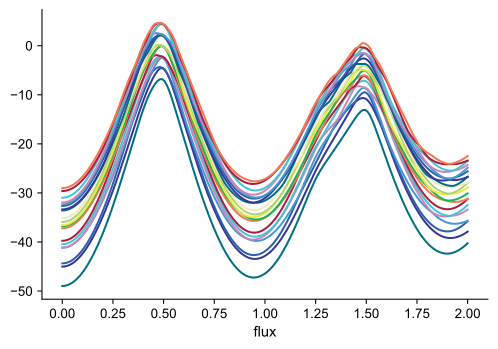
This result looks odd at first glance: where, for instance, is the flux-independent resonator line? The reason for the unfamiliar appearance is that we are plotting eigenvalues without subtracting the ground state energy. For that, see the .transitions() and .plot_transitions() methods below.
Transition plots#
Energy spectra obtained in single-tone or two-tone spectroscopy always represent transitions energies, rather than absolute energies of individual eigenstates. To generate data mimicking this, appropriate differences between eigenenergies must be taken.
The methods for generating transition energy data and plotting them are <ParameterSweep>.transitions(...) and <ParameterSweep>.plot_transitions(...). To create a plot, we use “pre-slicing” of the ParameterSweep instance to specify a sweep along a single axis, and then call .plot_transitions().
Note
Pre-slicing applies to ParameterSweep objects. It uses numpy or generalized slicing notation to specify a subset of the sweep. For plotting, the resulting subset should be a one-dimensional sweep. Note that pre-slicing does not actually discard any data. Rather, it internally marks the selected sub-sweep which is then looked up when applying .transitions() or plot_transitions().
[4]:
sweep["ng":0.0].plot_transitions();
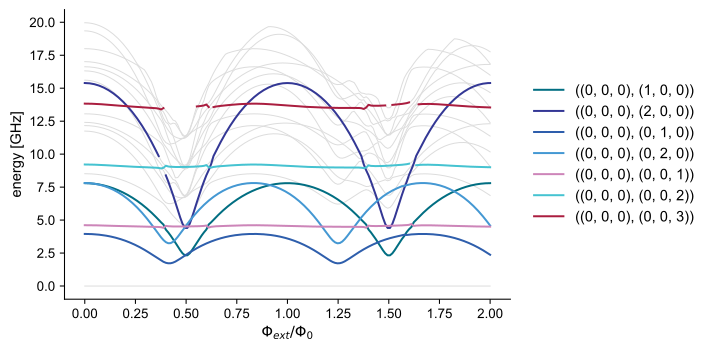
The generated transition plot is based on default choices (most of which can be overridden as needed):
The origin of each transition is the state “closest” to the bare product state (0, 0,…,0). In most cases, this will be the system’s ground state. (Ultrastrong coupling may violate this.)
By default, only single-photon transitions are included.
Transitions are generally plotted in light grey.
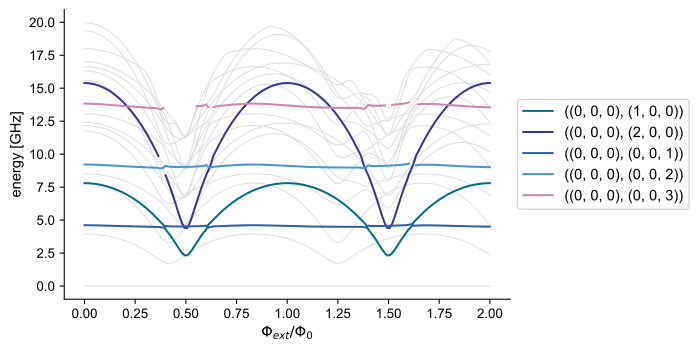
By default, transitions among states of individual subsystems are marked separately and accompanied by a legend. This is possible in regions where the dispersive approximation holds, i.e., hybridization between subsystems remains weak and there is a 1-to-1 mapping between dressed states and bare product states.
Labels in the legend are excitation levels of individual systems: ((0,0,0), (1,0,0)) denotes a transition from the ground state to the state with subsystem 1 (here:
tmon1) in the first excited state, and subsystems 2 and 3 in their respective ground states.
One peculiarity is nearly unavoidable when coloring transitions according to the dispersive-limit state labeling: whenever states undergo avoided crossings and the dispersive limit breaks down, coloring must discontinuously switch from one branch to another. scqubits attempts to interrupt coloring in such regions. However, if the avoided crossing is so narrow that it occurs between two adjacent parameter values, then discontinuities from connecting separate branches will remain visible.
Transition plot options#
Multiple aspects of transition energy plots can be changed. The following gives a quick overview; see the API documentation for a comprehensive discussion of options.
coloring#
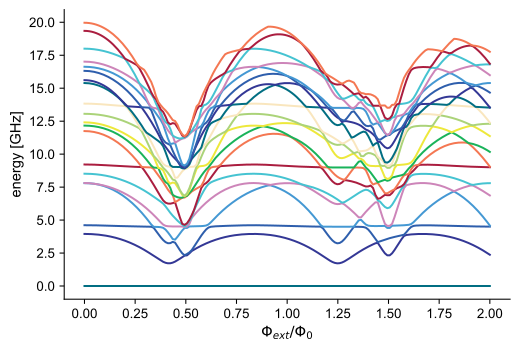
If ordinary coloring is preferred, this can be obtained by choosing "plain" coloring:
[19]:
sweep["ng":0.0].plot_transitions(coloring="plain");
subsystems#
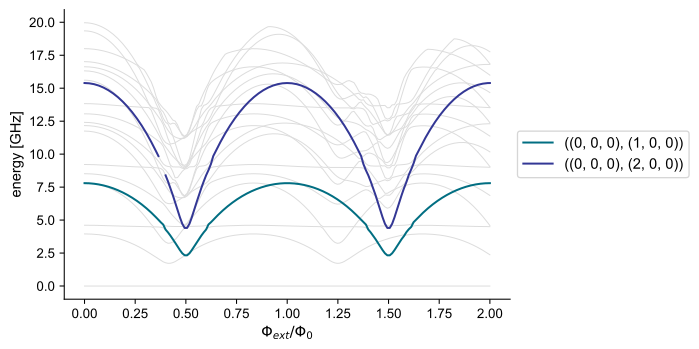
When coloring transitions according to nature of the transition, all subsystems are included by default. If transitions for a single or smaller set of subsystem(s) should be highlighted, then these are specified in list form:
[20]:
sweep["ng":0.0].plot_transitions(subsystems=[tmon1]);
initial and final#
By default, the state closest to the bare product state (0,0,…,0) is taken as origin for all transitions. (Except in cases of ultrastrong coupling, this is typically the ground state of the composite system.) In case of thermal excitations, other states can be of interest as initial states. Specification of an alternative initial state can use dispersive labeling of states:
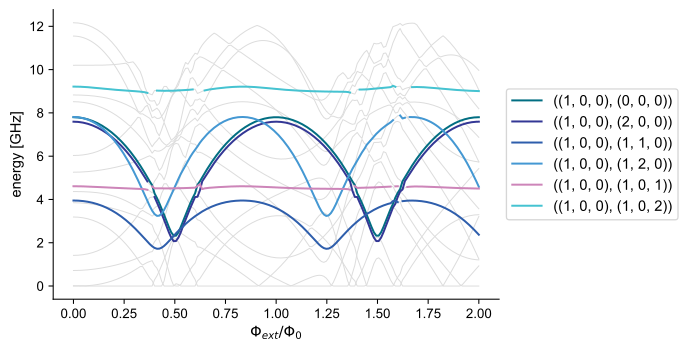
e.g., (1,0,0) uses the 1st excited tmon1 state as the initial state:
[21]:
sweep["ng":0.0].plot_transitions(initial=(1,0,0));
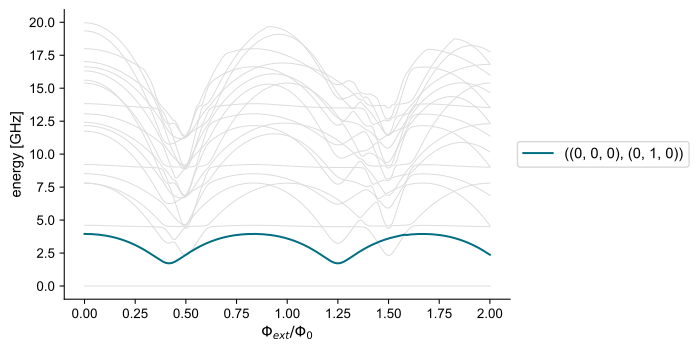
Similarly, the final option may be used if only the transitions to a specific state should be highlighted:
[22]:
sweep["ng":0.0].plot_transitions(final=(0,1,0));
Overall, initial and final inputs of different kinds accommodate a variety of situations:
Tuples of integers for
initialand/orfinalare interpreted as excitation numbers of bare product states. scqubits attempts an identification of dressed states with bare product states by considering maximum overlaps.Non-negative integer entries for
initialand/orfinalrefer to dressed-state indices (and lead to disabling of thesidebandsandsubsystemsoptions).The option
final=-1signals that all final states are selected for highlighting and are labeled via dressed-state indices.
photon_number#
For multi-photon transitions, this keyword argument can be set to the number of photons involved in the transition. This results in division of the transition energies by photon_number.
make_positive#
When considering excited as in the previous example, some of the transition energies will naturally be negative. Experimentally, these transitions are driven at the absolute frequency. By default, absolute values of transition energies are displayed. This can be disabled by setting make_positive=False.
sidebands#
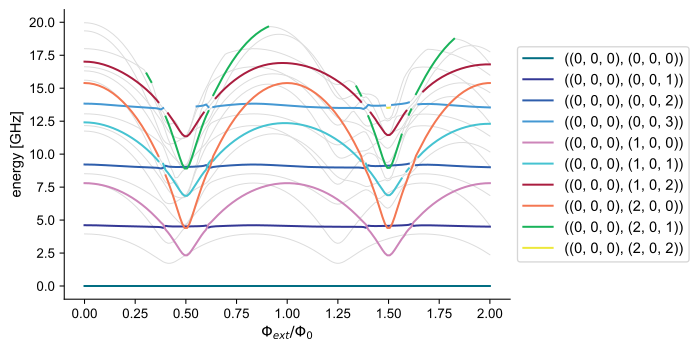
By default, sideband transitions are not highlighted. If set to true, sideband transitions with multiple subsystems changing excitation levels are included as well:
[23]:
sweep["ng":0.0].plot_transitions(subsystems=[tmon1, resonator], sidebands=True);
Custom sweeps#
ParameterSweep generates data commonly needed in a multi-component quantum system. Other quantities of interest can be generated by defining a custom sweep function generating the data and calling <ParameterSweep>.add_sweep(...).
To do so, define a function of the following form:
def custom_func(paramsweep, paramindex_tuple, paramvals_tuple, **kwargs): ... return data
As a toy example, here is a function that returns the 01 charge matrix element for tmon2 at each parameter point:
[24]:
def tmon2_n01(paramsweep, paramindex_tuple, paramvals_tuple, **kwargs):
    # We could recalculate matrix elements from scratch, but it is advantageous to use the bare spectral
    # data we have already calculated.
    bare_evecs = paramsweep["bare_evecs"]["subsys":1][paramindex_tuple]
    n_matrix_elements = tmon2.matrixelement_table(
        operator="n_operator",
        evecs=bare_evecs,
        evals_count=tmon2.truncated_dim,
    )
    return np.abs(n_matrix_elements[0,1])
The add_sweep method takes the callable function one argument, and the name under which the scan should be stored as the second argument:
[25]:
sweep[:].add_sweep(tmon2_n01, "n01")
Pre-slicing is required; here the sweep is to extend over all parameter sets associated with sweep. The resulting data is accessible by dict-like access, and yields a NamedSlotsNdarray:
[26]:
sweep["n01"]
[26]:
NamedSlotsNdarray([[1.30478755, 1.30478755, ..., 1.30478755, 1.30478755],
                   [1.30446711, 1.30446711, ..., 1.30446711, 1.30446711],
                   ...,
                   [1.02349545, 1.02349545, ..., 1.02349545, 1.02349545],
                   [0.99863368, 0.99863367, ..., 0.99863367, 0.99863368]])
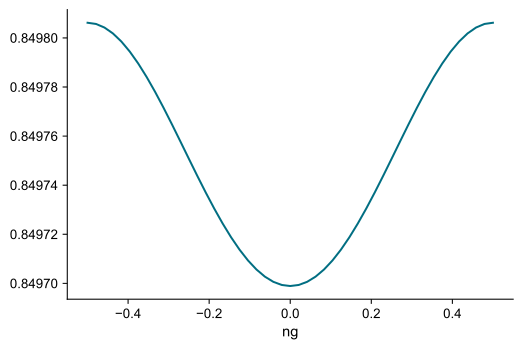
We can easily take a slice for fixed flux and plot the result:
[27]:
sweep["n01"]["flux":35].plot()
[27]:
(<Figure size 900x600 with 1 Axes>, <AxesSubplot:xlabel='ng'>)
Dispersive limit: Stark shifts and Kerr#
Coupled systems of qubits and harmonic modes are frequently operated in the dispersive regime where relevant transition frequencies are detuned from each other and hybridization among levels can be treated perturbatively. An effective description of this dispersive regime involves energy corrections and dispersive couplings phrased in terms of
Lamb shifts,
ac Stark shifts, and
Kerr terms,
to leading order. scqubits computes the associated coefficients as part of ParameterSweep and makes them accessible through
"lamb":NamedSlotsNdarraywith axes"subsys", <parameters>, <state label l>"chi":NamedSlotsNdarraywith axes"subsys1", "subsys2", <parameters>, <state label l>"kerr":NamedSlotsNdarraywith axes"subsys1", "subsys2", <parameters>, <state label l, l'>
For instance, here are dispersive ac Stark shifts associated with tmon1 (subsystem 0) and resonator (subsystem 2):
[28]:
sweep["chi"]["subsys1":0, "subsys2":2]
[28]:
NamedSlotsNdarray([[[ 7.10542736e-15, -4.28976197e-04,             nan],
                    [-7.10542736e-15, -4.28992818e-04,             nan],
                    ...,
                    [ 0.00000000e+00, -4.28649766e-04,             nan],
                    [ 0.00000000e+00, -4.28617406e-04,             nan]],

                   [[ 0.00000000e+00, -4.30205841e-04,             nan],
                    [ 7.10542736e-15, -4.30222514e-04,             nan],
                    ...,
                    [ 0.00000000e+00, -4.29878381e-04,             nan],
                    [ 7.10542736e-15, -4.29845917e-04,             nan]],

                   ...,

                   [[ 0.00000000e+00, -4.87527712e-04,             nan],
                    [ 0.00000000e+00, -4.87546333e-04,             nan],
                    ...,
                    [ 0.00000000e+00, -4.87160488e-04,             nan],
                    [ 0.00000000e+00, -4.87123928e-04,             nan]],

                   [[ 0.00000000e+00, -4.86674364e-04,             nan],
                    [ 0.00000000e+00, -4.86692762e-04,             nan],
                    ...,
                    [ 0.00000000e+00, -4.86311155e-04,             nan],
                    [-7.10542736e-15, -4.86275024e-04,             nan]]])
Note that the occurence of nan signals that in some instances the breakdown of the dispersive approximation prevents the identification of states with bare product states. Such breakdown regions will result in “interruptions” in plots. While not visually pleasing, they do inform us that the dispersive regime is invalid in those regions and their immediate vicinity.
Simple visualization of the dispersive shift associated with level 1 (ordinarily denoted \(\chi_{01}\)):
[29]:
sweep["chi"]["subsys1":0, "subsys2":2]["ng":0][:, 1].plot()
[29]:
(<Figure size 900x600 with 1 Axes>, <AxesSubplot:xlabel='flux'>)
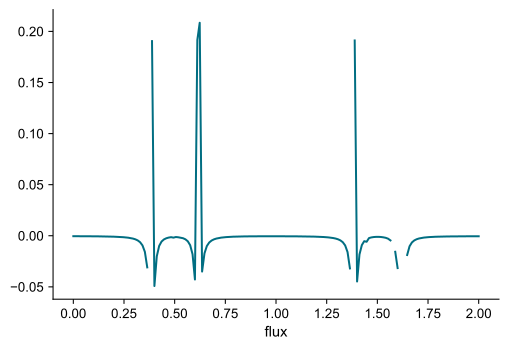
(Interruptions again mark dispersive-limit breakdown. The unattractive “spikes” actually correspond to capturing part of the transmon’s straddling regime, close to the breakdown of perturbation theory.)
Inspection of the transition spectrum matches the positions of singular behavior in \(\chi\) with avoided crossings:
[30]:
sweep["ng":0].plot_transitions(subsystems=[tmon1, resonator]);
Note
Since dressed eigenenergies are used to compute these coefficients, results will not precisely agree with a purely perturbative calculations stopping at finite order. For instance, the coefficients calculated here will not always show the divergences typical for the breakdown of perturbation theory at avoided crossings.
Theoretical background, definition of dispersive quantities#
Consider a system of harmonic modes (\(s=0,1,\ldots\)) and qubit modes (\(q=0,1,\ldots\)) coupled to each other,
Hamiltonian
If this system is fully dispersive, then the leading terms in the effective Hamiltonian, as obtained by a Schrieffer-Wolff transformation, can be written as:
Dispersive Hamiltonian
Here, the energy coefficients are:
Evaluation of energy coefficients#
The various energy coefficients are evaluated by forming appropriate energy differences of the dressed eigenenergies. Denote the latter as
With this the dispersive energy coefficients are:
Lamb shift, anharmonic mode \(\Delta\bar{\epsilon}^q_l = E(\vec{o},l\hat{e}_q) - E(\vec{o},\vec{o}) - \bar{\epsilon}^q_l\)
Lamb shift, harmonic mode \(\Delta\omega_s = E(\hat{e}_s,\vec{o}) - E(\vec{o},\vec{o}) - \omega_s\)
AC Stark shift \(\bar{\chi}^{sq}_l = E(\hat{e}_s,l\hat{e}_q) -(\epsilon^q_l + \Delta\epsilon^q_l) - (\omega_s + \Delta\omega_s) - E(\vec{o},\vec{o})\)
self-Kerr \(K_{s} = [E(2\hat{e}_s,\vec{o}) - E(\vec{o},\vec{o}) - 2(\omega_s + \Delta\omega_s)]/2\)
cross-Kerr \(K_{ss'} = E(\hat{e}_s + \hat{e}_{s'}) - E(\vec{o},\vec{o}) - (\omega_s + \Delta\omega_s) - (\omega_{s'} + \Delta\omega_{s'})\qquad (s\not=s')\)
anharmonic “Kerr” \(\Lambda^{qq'}_{ll'} = E(\vec{o}, l\hat{e}_q + l'\hat{e}_{q'},\vec{o}) - E(\vec{o},\vec{o}) - (\bar{\epsilon}^q_l + \Delta\bar{\epsilon}^q_l) - (\bar{\epsilon}^{q'}_{l'} + \Delta\bar{\epsilon}^{q'}_{l'})\qquad (s\not=s')\)
ParameterSweep helper functions#
Some of the helper methods available as part of the ParameterSweep class (see the API documentation for more details):
dressed_index obtain the dressed index corresponding to a bare index (use pre-slicing)
[31]:
sweep["flux":0, "ng":0].dressed_index((1,0,1))
[31]:
9
bare_index obtain the bare index (bare product state label) corresponding to a dressed index (use pre-slicing)
[32]:
sweep["flux":0, "ng":0].bare_index(8)
[32]:
(0, 2, 1)
energy_by_bare_index obtain the eigenenergy for given bare index (use pre-slicing)
[33]:
sweep["ng":0].energy_by_bare_index((1,1,0))
[33]:
NamedSlotsNdarray([11.750756260771439, 11.746489161977891, ...,
                   10.286595560237334, 10.171087725541547], dtype=object)