User-defined Diagonalization#
Often the most time consumuing operation that scqubits performs is a diagonalization of the system Hamiltonian when the eigensys or . scqubits allows users to sepcify what library or procedure is used, if something other than the default method (typically provided via the scipy library) is desired.
Such customization is done by setting esys_method and evals_method (and potentially esys_method_options and evals_method_options to further customize diagonalization options) of the different quantum system classes (which can be done at object initialization time, or alternatively, after the object has already been created).
Further more, esys_method and evals_method can be either: 1. A string that scqubits maps to a predefined diagonalization function, with some particular set of preset options. 2. An arbitrary, user-defined callable object (e.g., a function) that can perform the diagonalization.
Parameters esys_method_options and evals_method_options can be also set, if the user wishes to pass custom options to the diagonalization routines defined by esys_method and evals_method respectively. Setting these is a powerful way to easily customize how the diagonalization is performed.
Predefined procedures#
In the case of scenario (1) above, users can check all the predefined diagonalization procedures that have a string-representation by listing the keys of the DIAG_METHODS dictionary:
[2]:
print(*scq.DIAG_METHODS.keys(), sep="\n")
evals_scipy_dense
esys_scipy_dense
evals_scipy_sparse
esys_scipy_sparse
evals_scipy_sparse_SM
esys_scipy_sparse_SM
evals_scipy_sparse_LA_shift-inverse
esys_scipy_sparse_LA_shift-inverse
evals_scipy_sparse_LM_shift-inverse
esys_scipy_sparse_LM_shift-inverse
evals_primme_sparse
esys_primme_sparse
evals_primme_sparse_SM
esys_primme_sparse_SM
evals_primme_sparse_LA_shift-inverse
esys_primme_sparse_LA_shift-inverse
evals_primme_sparse_LM_shift-inverse
esys_primme_sparse_LM_shift-inverse
evals_cupy_dense
esys_cupy_dense
evals_cupy_sparse
esys_cupy_sparse
In the above, the first part of the string represents whether just the eigenvalues or both eigenvalues and eigenvectors are returned. Naturally, procedures that return the eigenvalues (eigenvalues and eigenvectors) are used by the method eigenvals (eigensys) of the different quantum objects that scqubits implements. The second word labels what library is used (e.g., scipy or cuda, etc.), and the third, whether sparse or dense diagonalization should be performed.
Everything that follows, is simply some description of specific diagonalization options that are used.
For example, a method esys_cupy_sparse will invoke the diagonalization function eigsh from the sparse implemetnation of the cupy library (see here), which will return the lowest set of requested eigenvalues and eigenvectors (i.e., will have the options which='SA' passed in).
On the other hand, setting esys_method to "esys_scipy_sparse_LA_shift-inverse", while instantiating a quantum system object (e.g., a Transmon), when Transmon.eigensys method is called, scqubits will call internally invoke the scipy’s sparse diagonalization routine (here eighs). Furthermore, the shift-inverse method will be used, while algebraic (and not by magnitude) eienvalue ordering is used (i.e., which='LA' will be passed to eighs - see scipy’s
documnetation for more details).
Note
It is crucial to note that in some cases, a particular method may be the wrong choice. For example in quantum systems where the eigenenergies are not guaranteed to be positive, using the “SM” method (that sorts eigenvalues by magnitude), may lead to incorrect results.
scqubits supports a number of backend libraries such as, scipy, primme, cupy (which allows for GPU-based diagonalization).
Note
Some of the libraries that can be used for diagonalization (e.g., cupy or primme) are only optional depedenecies of scqubits. Naturally, however, they do need to be installed before a digonalization method that relies on them is selected.
As an example, let us consider a fluxonium qubit with a custom diagonalization method (and options set by providing a dictionary to evals_method_options), that take advante of the sparase diagonalization routine provided by the primme library.
[3]:
fluxonium= scq.Fluxonium(EJ=8.9, EC=2.5, EL=0.5, flux = 0.5, cutoff = 120,
                        evals_method='evals_primme_sparse',
                        evals_method_options=dict(tol=1e-4))

evals = fluxonium.eigenvals()
We can compare the eigenvalues obtained useing the primme to the default scqubits method (by resettting evals_method and evals_method_options to None)
[4]:
fluxonium.evals_method = None
fluxonium.evals_method_options = None

evals_default = fluxonium.eigenvals()
print(evals_default)
[-0.63001146 -0.26659009 8.75633751 11.69881054 16.67252211 17.42908833]
Comparing the two approaches shows the same results
[5]:
np.allclose(evals, evals_default)
[5]:
True
Note
In the future version of scqubits one will be able to optionally also retrieve metadata about the diagonalization process that is often available to the user by the different libraries.
Custom procedures#
As outlined above, the diagonalization procedures can be even further customized. This is done by, instead of passing a string-based description as esys_method or evals_method, providing a callable object (e.g., function). In principle this approach could be used to take advantage of 3rd party libraries (e.g., that use GPUs) that may not have yet been directly utilized in scqubits. In the following trivial example, a simple user-defined function custom_esys (that internally calls
scipy.linalg.eigh) is used for the diagonalization.
[6]:
def custom_esys(matrix, evals_count, **kwargs):
    evals, evecs = sp.linalg.eigh(
        matrix, subset_by_index=(0, evals_count - 1),
        eigvals_only=False,
        **kwargs
    )
    return evals, evecs

tmon = scq.Transmon(EJ=30.02, EC=1.2, ng=0.0, ncut=501,
                    esys_method=custom_esys,
                    esys_method_options=dict(driver='evr'))
We can see what all the diagonalization related variables of tmon are set to - both esys_method and esys_method_options are now not None:
[7]:
print(tmon.esys_method,
      tmon.esys_method_options,
      tmon.evals_method,
      tmon.evals_method_options, sep="\n")
<function custom_esys at 0x7f4868389c10>
{'driver': 'evr'}
None
None
We can then diagonalize the system with a standard call to eigensys, which will return both the eigenvalues as well as the eigenvectors:
[8]:
evals, evecs = tmon.eigensys()
Let us compare the above results with the default diagonalization method (which in the case of the transmon qubit is done usingg scipy.linalg.eigvalsh_tridiagonal):
[9]:
tmon.esys_method = None
tmon.esys_method_options = None

evals_default, evecs_default = tmon.eigensys()
Comparing the eigenvalues obtained using the two procedures gives
[10]:
np.allclose(evals, evals_default)
[10]:
True
and for the eigenvecotrs:
[11]:
print(*[np.allclose(evecs[i], evecs_default[i]) for i,_ in enumerate(evals)])
True True True True True True
Diagonalization of composite systems#
Custom diagonaliation procedure can set by the user for both, the predefined qubit classes (as shown above), but also for systems consisting of joint Hilbert spaces. Since often one is intersted in a low-lying energy landscape of larger systems, scqubits uses the concept of hierarchical diagonalization to minimize the sice of the relevant Hilber space that has to be considered: Each system is first diagonalized
separately, the coupling terms are then rewritten in the (often some subset of) repsective eigenbasis, and finally the combained sytem is diagonalized at the end. This gives a lot of control to the user, and scqubits allows one to set custom (and even different) diagonalization procedure for each step of this process.
Note
In the fututure version of scqubits, users will be also able to define their diagonalization procedure of choice, when working with Custom circuits.
Here as an example of a joint system consisting of a Fluxonium and a Transmon qubit, where each qubit, as the combined Hamiltonian are all diagonalized using a diefferent method.
[12]:
tmon = scq.Transmon(EJ=30.02, EC=1.2, ng=0.0, ncut=101, ) # default diaongalization method
fluxonium= scq.Fluxonium(EJ=8.9, EC=2.5, EL=0.5, flux = 0.5, cutoff = 110,
                         evals_method='evals_primme_sparse' # use the primme library
                        )

hs = scq.HilbertSpace([tmon, fluxonium],
                     evals_method='evals_scipy_sparse' # use scipy
                     )

hs.add_interaction(
    g_strength = 0.250,
    op1 = tmon.n_operator,
    op2 = fluxonium.n_operator,
    add_hc = True
);
[13]:
evals = hs.eigenvals(evals_count=10)
Let us reset the diagonalization methods to default, for both the fluxonium as well as hs:
[14]:
fluxonium.evals_method=None
hs.evals_method=None
and compare the results results with those obtained above
[15]:
evals_default = hs.eigenvals(evals_count=10)
np.allclose(evals, evals_default)
[15]:
True
Note that regardless of the (predefined) diagonalization procedure that has been used, the eivenectors that are returened are objects of the type qutip.Qobj, and hence remember their Hilbert space (i.e. tensor product) structure.
[21]:
hs.esys_method='esys_primme_sparse'
evals, evecs = hs.eigensys()
[24]:
evecs[3]
[24]:
GPU support#
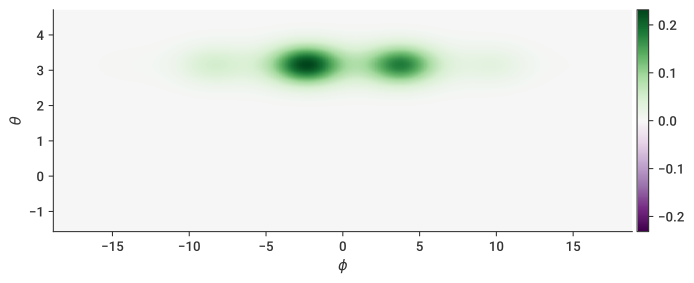
Diagonalization on GPUs is currently supported through the cupy library. As the capabilities of cupy are currently somewhat limited, only dense (not sparse) operations are supported. As already outlined above, cupy (and its dependecies) have to be installed in order for this functionality to work, as show here:
It is worth pointing out, that depending on one’s hardware, and the quantum system studied, the performance of GPU vs CPU diagonalization may vary dramatically from setup to setup.
[17]:
import cupy
cupy.__version__
[17]:
'12.1.0'
[18]:
zero_pi = scq.ZeroPi(
    grid = scq.Grid1d(-6*np.pi, 6*np.pi, 200),
    EJ   = 10.0,
    EL   = 0.04,
    ECJ  = 20.0,
    EC = 0.04,
    ng   = 0.1,
    flux = 0.23,
    ncut = 10,  #smaller than needed, for testing purposes
    esys_method='esys_cupy_dense',
    evals_method='evals_cupy_dense',
)
[19]:
fig, ax = zero_pi.plot_wavefunction(which=1, mode='real', zero_calibrate=True);
[20]:
flux_list = np.linspace(0, 1, 27)
zero_pi.plot_evals_vs_paramvals('flux', flux_list, evals_count=8);

[ ]: