Initiating a Circuit object
The Circuit class supports all superconducting circuits consisting of capacitances, inductances, and Josephson junctions. A Circuit object can be initiated in two different ways: - By providing a yaml file that describes the circuit graph - By providing a symbolic Hamiltonian which represents the circuit (described here)
In this notebook, we will demonstrate how to define a circuit graph.
Defining a Circuit Graph
We will describe the circuit graph using a yaml file. For example, consider the circuit of the zero-\(\pi\) qubit.
Consider the circuit of the zero-pi qubit:
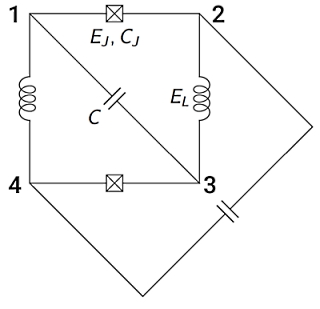
The above circuit is specified branch by branch, using the following syntax:
[1]:
zp_yaml = """# zero-pi
branches:
- [JJ, 1,2, EJ=10nA, ECJ=200pF]
- [JJ, 3,4, EJ, 20GHz]
- [L, 2,3, EL=10uH]
- [L, 4,1, 0.008]
- [C, 1,3, 0.02]
- [C, 2,4, 0.02]
"""
Summary of the above input file (a detailed description is given in the next page):
The input is just a collection of branches which make the circuit. Each branch connecting node \(n_i\) to \(n_f\) is a list with the following items: - branch type: - JJ for Josephson junction, - L for inductance, - C for capacitance - initial node index: \(i\) - final node index: \(f\) - branch parameters corresponding to the branch type: - JJ: EJ, ECJ - L: EL - C: EC
Alternatively, circuit specifications can be stored and loaded as yaml files (same syntax as above), which can be directly provided to the Circuit class.
Graphical user interface (GUI) for defining custom circuits
Superconducting Circuit Builder (developed by Ben McDonough) is a separate package that offers the GUI for defining custom circuits: the user can draw a circuit, and can export a corresponding YAML string of the circuit. The package is available here.