Parametric Driving
scqubits can simplify simulations of dynamics using qutip, by automating the building of the dynamical Hamiltonians that can be directly subsituted to qutip’s solver routines such as mesolve, mcsolve, etc.
[1]:
import matplotlib.pyplot as plt
import numpy as np
import qutip as q
import scqubits as scq
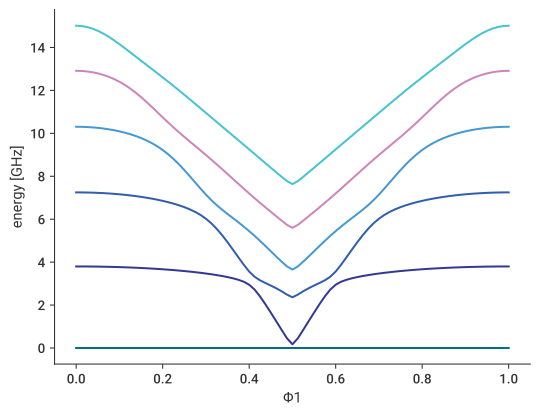
Let us define a circuit and look at its spectrum
[2]:
# Let's start by defining a fluxonium
inp_yaml = """
branches:
- [JJ, 1, 2, 4, 0.5]
- [L, 1, 2, 1.3]
- [C, 1, 2, 2]
"""
circ = scq.Circuit(inp_yaml, from_file=False, use_dynamic_flux_grouping=True, ext_basis="discretized")
circ.cutoff_ext_1 = 100
circ.Φ1 = 0.5
[3]:
eigs = circ.eigenvals()
eigs - eigs[0]
[3]:
array([0.        , 0.1734474 , 2.36189081, 3.65328642, 5.59769016,
       7.63584593])
[12]:
circ.plot_evals_vs_paramvals("Φ1", np.linspace(0, 1, 81), subtract_ground=True);
Rabi oscillations
And study Rabi oscillations generated by modulating the flux
[13]:
# defining Hierarchical diagonalization to limit to the lowest two states
circ.configure(system_hierarchy=[[1]], subsystem_trunc_dims=[10])

# specific form of the flux modulation
def flux_ac(t, args):
        freq = args["freq"]
        return 0.001*np.sin(2*np.pi*freq*t)

# asking the method to return Hamiltonian when Φ1 is varied around the bias point
# H_mesolve is the Hamiltonian to be used in the Qutip method mesolve
H_mesolve, *H_sym_ref = circ.hamiltonian_for_qutip_dynamics(free_var_func_dict={"Φ1": flux_ac}, prefactor=np.pi*2)

eigs, evecs = circ.eigensys(evals_count=5)
wf0 = q.Qobj(evecs[:, 0]) # ground state as initial state

initial_state_proj = wf0 * wf0.dag() # to see the overlap
tf = 100 # final time in nanoseconds
freq = eigs[1] - eigs[0] # transition frequency between the first two states

# evolve the system
result = q.mesolve(H_mesolve, wf0, np.linspace(0, tf, 500), args={"freq": freq}, e_ops=[initial_state_proj])
[14]:
fig, ax=plt.subplots()
ax.plot(result.times, result.expect[0])
ax.set_xlabel('Time (ns)')
ax.set_ylabel('Ground state population')
[14]:
Text(0, 0.5, 'Ground state population')

Note that the steps like features over the sinusiod in the above plot, is because we have not used RWA in the drive Hamiltonian.
Example Floquet Simulation
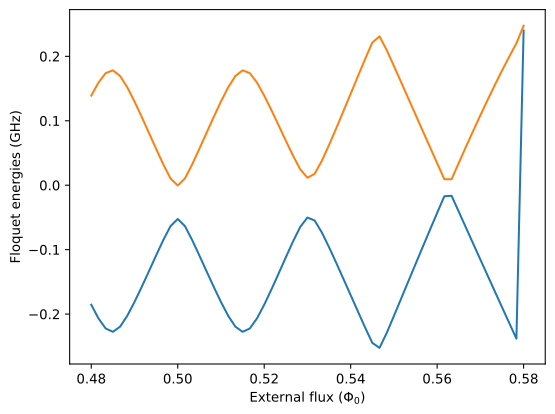
We can also explore a Floquet simulation
[4]:
# defining Hierarchical diagonalization to limit to the lowest two states
circ.configure(system_hierarchy=[[1]], subsystem_trunc_dims=[2])

all_eigs = []
flux_vals = np.linspace(0.48, 0.58, 61)
for flux in flux_vals:

    circ.Φ1 = flux
    eigs, evecs = circ.eigensys(evals_count=2)
    psi0 = q.Qobj(evecs[:, 0])
    freq = 510e-3

    def flux_ac(t, args):
        freq = args["freq"]
        return 0.028*np.cos(2*np.pi*freq*t)

    t = np.linspace(0, 1/freq, 300)
    H_mesolve, *b = circ.hamiltonian_for_qutip_dynamics(free_var_func_dict={"Φ1": flux_ac}, prefactor=np.pi*2)
    # calculating the floquet energies
    res = q.propagator(H_mesolve, t=t, args={"freq": freq})
    u_eigs = res[-1].eigenenergies()
    floquet_eigs = np.arctan2(np.real(u_eigs), np.imag(u_eigs))
    floquet_eigs.sort()
    floquet_eigs = floquet_eigs * freq / (2*np.pi)
    all_eigs.append(floquet_eigs)
[5]:
fig, ax=plt.subplots()
plt.plot(flux_vals, all_eigs)
ax.set_xlabel(r'External flux ($\Phi_0$)')
ax.set_ylabel('Floquet energies (GHz)')
[5]:
Text(0, 0.5, 'Floquet energies (GHz)')