Working with NamedSlotsNdarray
Parameter information
For convenience, NamedSlotsNdarray stores information about the parameters along with the array. Our array has the shape
[7]:
sweep["evals"].shape
[7]:
(171, 49, 20)
The associated parameters are obtained through the NamedSlotsNdarray attribute param_info:
[8]:
sweep["evals"].param_info
[8]:
OrderedDict([('flux',
              array([0.        , 0.01176471, ..., 1.98823529, 2.        ])),
             ('ng',
              array([-0.5       , -0.47916667, ...,  0.47916667,  0.5       ]))])
There are two names axes, one for the flux parameter, one for the offset charge parameter. The last (unnamed) axis is for the number of eigenvalues at each point (the default is 20).
The param_info entries are kept up-to-date upon slicing an NamedSlotsNdarray:
[9]:
sliced_data = sweep["evals"][0, :]   # fix flux to the first parameter value and keep all ng values
print(sliced_data.shape)
print(sliced_data.param_info)
(49, 20)
OrderedDict([('ng', array([-0.5       , -0.47916667, ...,  0.47916667,  0.5       ]))])
Once all named axes have been collapsed, we return to an ordinary numpy array:
[10]:
sweep["evals"][3, 5]
[10]:
array([-48.62879419, -44.69222677, ..., -29.34186695, -28.71590343])
Generalized slicing with NamedSlotsNdarray
Name-based slicing
While the order of axes in a NamedSlotsNdarray is maintained consistently, referring to an axis by its name can be convenient. In this name-based slicing, order of index entries does not matter:
[11]:
(sweep["evals"]["flux":5, "ng":7],
 sweep["evals"]["ng":7, "flux":5])
[11]:
(array([-48.01009565, -44.09912786, ..., -28.83587136, -28.19100498]),
 array([-48.01009565, -44.09912786, ..., -28.83587136, -28.19100498]))
Name-based slicing allows for start and stop. For example, ["flux":3:-2] chooses the flux parameter values from element 4 to the second-but-last element. (A step entry is not supported for name-based slicing.)
Note
Name-based slicing and ordinary slicing by axes position cannot be mixed. If a multi-index contains a name-based entry, then all entries must be name-based.
Value-based slicing
Generalized slicing includes the possibility to refer to an array axis by a parameter value rather than through its index. One downside of this: the parameter value needs to be entered in full with all relevant decimals. This option therefore makes most sense when parameter value arrays are built commensurate with simple decimals.
Example: the ng value 0.0 is one value in the ng parameter array. We can access it via
[12]:
sweep["evals"][:, 0.0]
[12]:
NamedSlotsNdarray([[-48.9776994 , -45.02697343, ..., -29.62767069,
                    -29.01259019],
                   [-48.93884687, -44.98968522, ..., -29.59581918,
                    -28.97953529],
                   ...,
                   [-40.69998479, -38.210735  , ..., -23.6119997 ,
                    -22.82192523],
                   [-40.26251587, -37.8914427 , ..., -23.40840165,
                    -22.49727021]])
Value-based indexing will ordinarily fail if values entered do not match concrete values in the original array of values. This behavior can be changed in favor of more forgiving “fuzzy” value-based indexing which selects the closest value to the one entered. This is enabled by changing the default for FUZZY_SLICING:
[13]:
scq.settings.FUZZY_SLICING = True
sweep["evals"]["ng":0.001]
UserWarning: Using fuzzy value based indexing: selected value is 0.0
 : 24
[13]:
NamedSlotsNdarray([[-48.9776994 , -45.02697343, ..., -29.62767069,
                    -29.01259019],
                   [-48.93884687, -44.98968522, ..., -29.59581918,
                    -28.97953529],
                   ...,
                   [-40.69998479, -38.210735  , ..., -23.6119997 ,
                    -22.82192523],
                   [-40.26251587, -37.8914427 , ..., -23.40840165,
                    -22.49727021]])
Value-based and string-based slicing can be combined. The following thus produces the same result:
[14]:
sweep["evals"]["ng":0.0]
[14]:
NamedSlotsNdarray([[-48.9776994 , -45.02697343, ..., -29.62767069,
                    -29.01259019],
                   [-48.93884687, -44.98968522, ..., -29.59581918,
                    -28.97953529],
                   ...,
                   [-40.69998479, -38.210735  , ..., -23.6119997 ,
                    -22.82192523],
                   [-40.26251587, -37.8914427 , ..., -23.40840165,
                    -22.49727021]])
Distinction between value-based and index-based slicing. All integer entries in slicing are interpreted as index-based slicing, whereas floats are taken as value-based. Thus, ["flux":1.0] is the flux value 1.0 (if existent), whereas ["flux":1] is the second (!) entry in the flux values array.
Note: when using integer-valued parameters such as ncut, value-based slicing should not be used.
Quick plotting of sweep data
Once a NamedSlotsNdarray is reduced to a single parameter axis, data can readily be plotted using the plot() method:
[15]:
sweep["evals"][:,0].plot()
[15]:
(<Figure size 640x480 with 1 Axes>, <Axes: xlabel='flux'>)
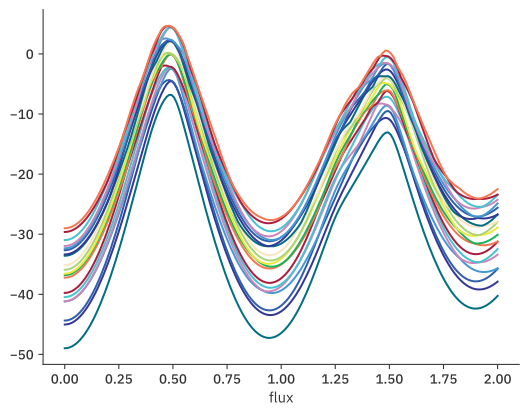
This result looks odd at first glance: where, for instance, is the flux-independent resonator line? The reason for the unfamiliar appearance is that we are plotting eigenvalues without subtracting the ground state energy. For that, see the .transitions() and .plot_transitions() methods in ParameterSweep.