Transition plots
Energy spectra obtained in single-tone or two-tone spectroscopy always represent transitions energies, rather than absolute energies of individual eigenstates. To generate data mimicking this, appropriate differences between eigenenergies must be taken.
The methods for generating transition energy data and plotting them are <ParameterSweep>.transitions(...) and <ParameterSweep>.plot_transitions(...). To create a plot, we use “pre-slicing” of the ParameterSweep instance to specify a sweep along a single axis, and then call .plot_transitions().
Note
Pre-slicing applies to ParameterSweep objects. It uses numpy or generalized slicing notation to specify a subset of the sweep. For plotting, the resulting subset should be a one-dimensional sweep. Note that pre-slicing does not actually discard any data. Rather, it internally marks the selected sub-sweep which is then looked up when applying .transitions() or plot_transitions().
[4]:
sweep["ng":0.0].plot_transitions();
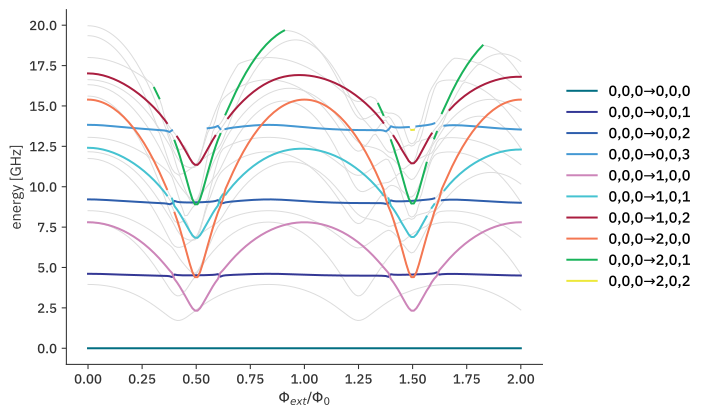
The generated transition plot is based on default choices (most of which can be overridden as needed):
The origin of each transition is the state “closest” to the bare product state (0, 0,…,0). In most cases, this will be the system’s ground state. (Ultrastrong coupling may violate this.)
By default, only single-photon transitions are included.
Transitions are generally plotted in light grey.
By default, transitions among states of individual subsystems are marked separately and accompanied by a legend. This is possible in regions where the dispersive approximation holds, i.e., hybridization between subsystems remains weak and there is a 1-to-1 mapping between dressed states and bare product states.
Labels in the legend are excitation levels of individual systems: ((0,0,0), (1,0,0)) denotes a transition from the ground state to the state with subsystem 1 (here:
tmon1) in the first excited state, and subsystems 2 and 3 in their respective ground states.
One peculiarity is nearly unavoidable when coloring transitions according to the dispersive-limit state labeling: whenever states undergo avoided crossings and the dispersive limit breaks down, coloring must discontinuously switch from one branch to another. scqubits attempts to interrupt coloring in such regions. However, if the avoided crossing is so narrow that it occurs between two adjacent parameter values, then discontinuities from connecting separate branches will remain visible.
Transition plot options
Multiple aspects of transition energy plots can be changed. The following gives a quick overview; see the API documentation for a comprehensive discussion of options.
coloring
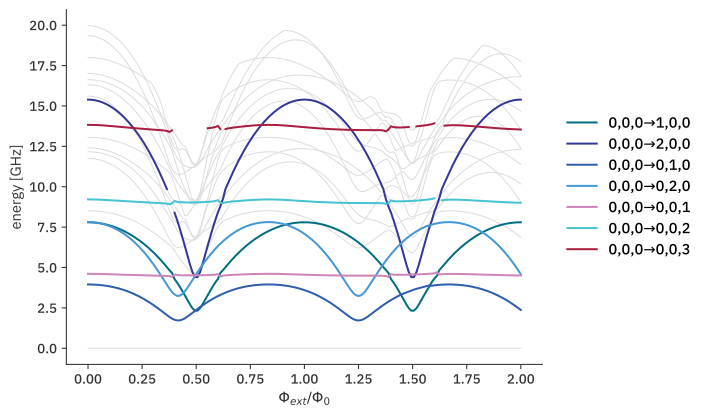
If ordinary coloring is preferred, this can be obtained by choosing "plain" coloring:
[5]:
sweep["ng":0.0].plot_transitions(coloring="plain");

subsystems
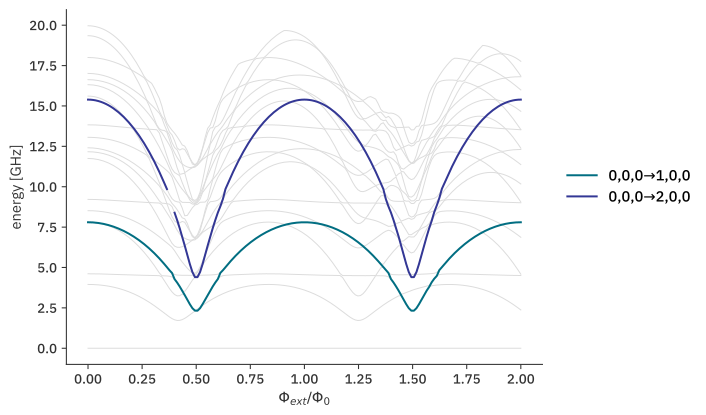
When coloring transitions according to nature of the transition, all subsystems are included by default. If transitions for a single or smaller set of subsystem(s) should be highlighted, then these are specified in list form:
[6]:
sweep["ng":0.0].plot_transitions(subsystems=[tmon1]);
initial and final
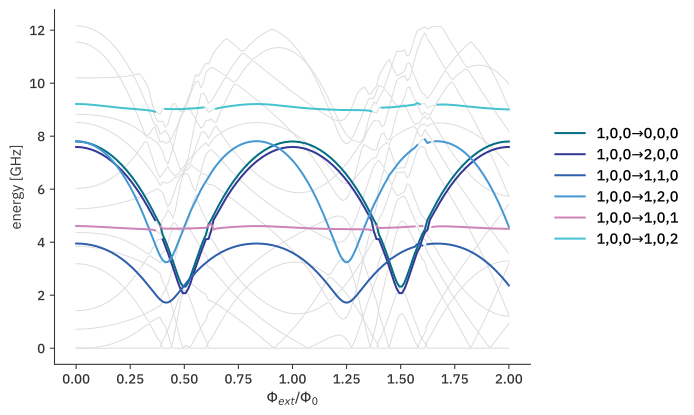
By default, the state closest to the bare product state (0,0,…,0) is taken as origin for all transitions. (Except in cases of ultrastrong coupling, this is typically the ground state of the composite system.) In case of thermal excitations, other states can be of interest as initial states. Specification of an alternative initial state can use dispersive labeling of states:
e.g., (1,0,0) uses the 1st excited tmon1 state as the initial state:
[7]:
sweep["ng":0.0].plot_transitions(initial=(1,0,0));
Similarly, the final option may be used if only the transitions to a specific state should be highlighted:
[8]:
sweep["ng":0.0].plot_transitions(final=(0,1,0));
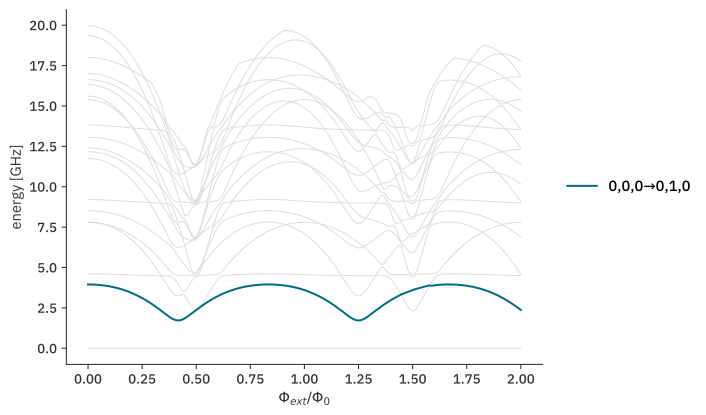
Overall, initial and final inputs of different kinds accommodate a variety of situations:
Tuples of integers for
initialand/orfinalare interpreted as excitation numbers of bare product states. scqubits attempts an identification of dressed states with bare product states by considering maximum overlaps.Non-negative integer entries for
initialand/orfinalrefer to dressed-state indices (and lead to disabling of thesidebandsandsubsystemsoptions).The option
final=-1signals that all final states are selected for highlighting and are labeled via dressed-state indices.
photon_number
For multi-photon transitions, this keyword argument can be set to the number of photons involved in the transition. This results in division of the transition energies by photon_number.
make_positive
When considering excited as in the previous example, some of the transition energies will naturally be negative. Experimentally, these transitions are driven at the absolute frequency. By default, absolute values of transition energies are displayed. This can be disabled by setting make_positive=False.
sidebands
By default, sideband transitions are not highlighted. If set to true, sideband transitions with multiple subsystems changing excitation levels are included as well:
[9]:
sweep["ng":0.0].plot_transitions(subsystems=[tmon1, resonator], sidebands=True);